Understanding package manager and systemctl
Day -7 #90daysofdevops
Nikhil Patil
👨💻 I love Linux & DevOps! 💻
🐧 Linux👨💻 | DevOps & Cloud Enthusiast | 🌍 Azure Admin | 🛠️ Ansible | 📂 Git | 🐳 Docker | 🔑 OpenLDAP | 🖥️ System Admin | | 🚀 Jenkins 🛠️
🏠 Pune
🌟 I'm really into using and managing computers with Linux. I also like making things work smoothly and quickly.
📖 I work with Microsoft Azure, use tools like Ansible and Git to automate tasks, and make software run in containers with Docker.
🔒 I handle access and security using OpenLDAP, and I'm all about keeping systems running smoothly.
🌐 Exploring opportunities in cloud and DevOps.
📧 Get in touch: nikrpatil1997@gmail.com
What is a package manager in Linux?
A package manager is like a smart helper that makes installing and updating programs on your computer easy. It's like a digital store where you can find and download software easily.
Different kinds of package managers
RPM (Redhat Package Manager )
RPM is a package managing system (a collection of tools to manage software packages). RPM is a powerful software management tool for installing, uninstalling, verifying, querying, and updating software packages.
YUM (Yellowdog Updater Modified)
It is an open-source and popular command line package manager that works as an interface for users to RPM. An older version of DNF is used in some Red Hat-based systems.
APT (Advanced Package Tool)
This is found in Debian and Ubuntu-based systems. It handles updates and keeps your software up-to-date automatically. APT is like a friendly guide that helps you find and install software
DNF (Dandified Yum)
It is used in Fedora and Red Hat-based systems. DNF is designed to make installing, updating, and removing software on your system easier and more efficient.
Task- 1 You have to install docker using package managers
Docker Installation:
For Debian/Ubuntu-based distributions (APT)
apt install docker
For Red Hat/CentOS-based distributions(Yum)
yum install docker
For fedora-based distributions (DNF)
dnf install docker
Task- 2 You have to install Jenkins using package managers
Jenkins Installation
For Debian/Ubuntu-based distributions (APT)
wget -q -O - https://pkg.jenkins.io/debian-stable/jenkins.io.key | sudo gpg --dearmor -o /usr/share/keyrings/jenkins.gpg

sudo sh -c 'echo deb [signed-by=/usr/share/keyrings/jenkins.gpg] http://pkg.jenkins.io/debian-stable binary/ > /etc/apt/sources.list.d/jenkins.list'

sudo apt install jenkins
For Red Hat/CentOS-based distributions(Yum)
sudo  curl --silent --location http://pkg.jenkins-ci.org/redhat-stable/jenkins.repo | sudo tee /etc/yum.repos.d/jenkins.repo

sudo rpm --import https://jenkins-ci.org/redhat/jenkins-ci.org.key

sudo yum install jenkins
For fedora-based distributions (DNF)
sudo wget -O /etc/yum.repos.d/jenkins.repo     https://pkg.jenkins.io/redhat-stable/jenkins.repo

sudo rpm --import https://pkg.jenkins.io/redhat/jenkins.io-2023.key

sudo dnf install jenkins
systemctl and systemd
Systemd :
Systemd is a special software program that manages how your computer starts up, operates, and shuts down.
Systemctl :
Systemctl is a powerful tool in Linux that allows you to manage and control various services on your computer.
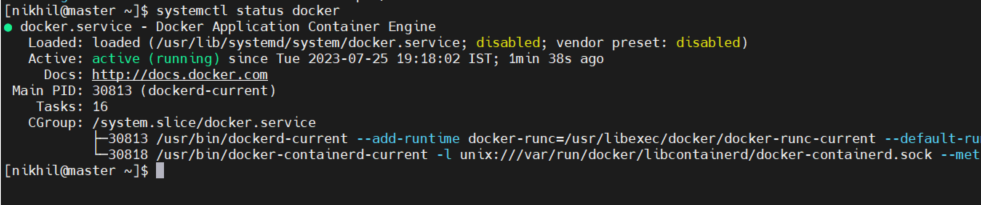
Task -3 check the status of docker service in your system
systemctl status docker
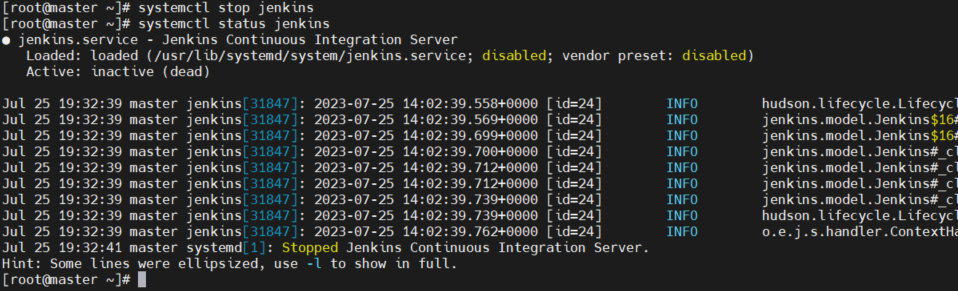
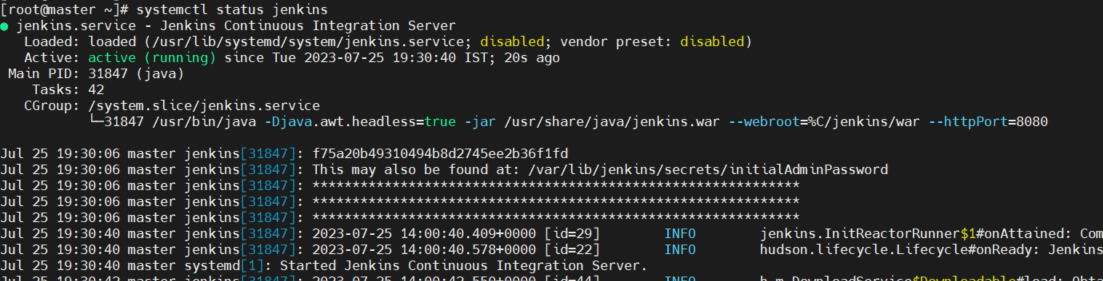
Task -4 stop the service jenkins:
systemctl status jenkins
systemctl stop jenkins
systemctl status jenkins