Nikhil Patil
👨💻 I love Linux & DevOps! 💻
🐧 Linux👨💻 | DevOps & Cloud Enthusiast | 🌍 Azure Admin | 🛠️ Ansible | 📂 Git | 🐳 Docker | 🔑 OpenLDAP | 🖥️ System Admin | | 🚀 Jenkins 🛠️
🏠 Pune
🌟 I'm really into using and managing computers with Linux. I also like making things work smoothly and quickly.
📖 I work with Microsoft Azure, use tools like Ansible and Git to automate tasks, and make software run in containers with Docker.
🔒 I handle access and security using OpenLDAP, and I'm all about keeping systems running smoothly.
🌐 Exploring opportunities in cloud and DevOps.
📧 Get in touch: nikrpatil1997@gmail.com
📌 Task 1: Importance of Terraform State
The Terraform state stored information about the resources and configurations that Terraform manages. The Terraform state provides several important functions and plays a central role in how Terraform manages and updates infrastructure.
As we have a terraform file
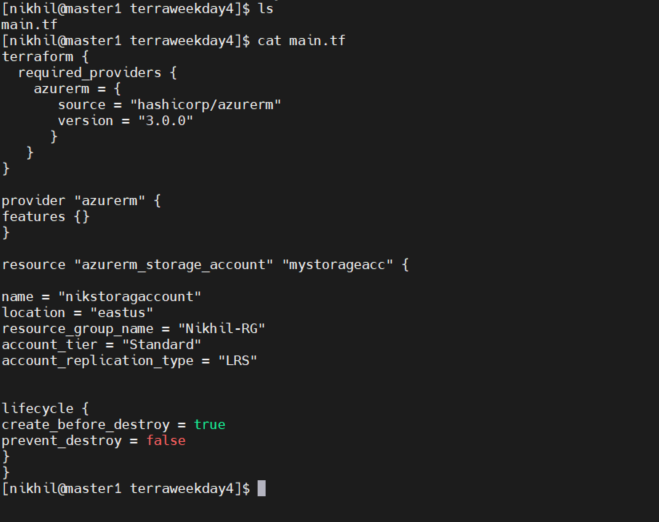
After pushing the files it will create the terraform state file
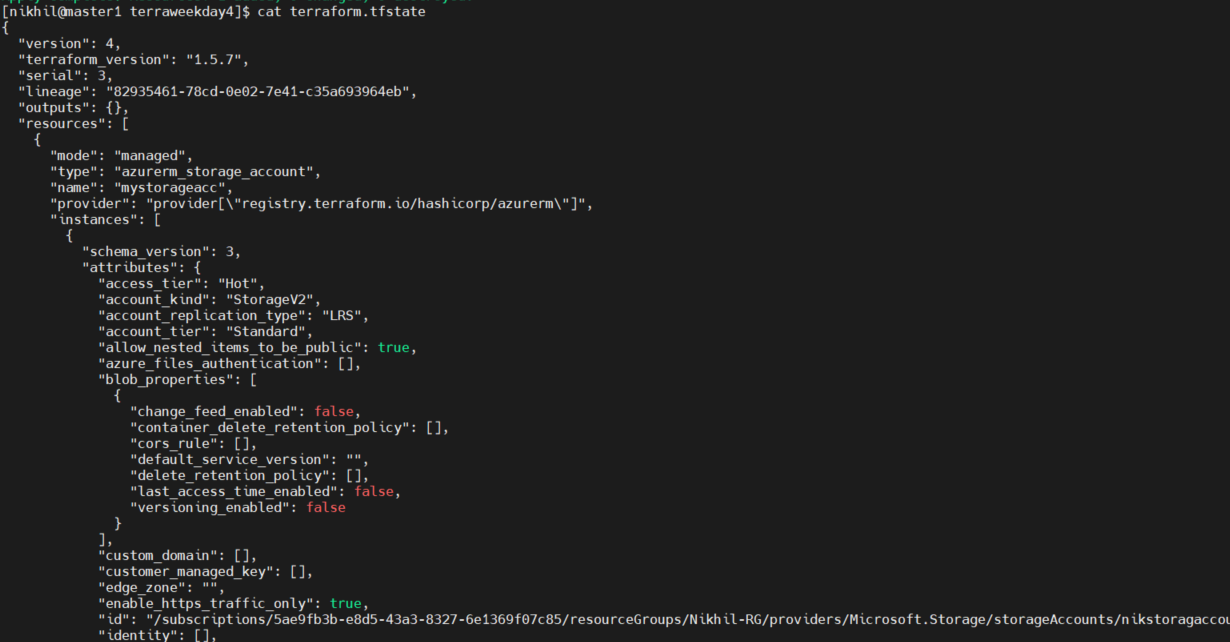
importance of the terraform state
Terraform state keeps track of the resources it manages. It stores information about the current state of your infrastructure, including resource attributes and their dependencies.
Terraform state helps prevent resource conflicts when multiple team members are working on the same infrastructure simultaneously.
The state file contains detailed information about each managed resource, including its attributes, IDs, and other metadata. This information can be useful for troubleshooting, auditing, and reporting on your infrastructure.
📌 Task 2: Local State and terraform state Command
Terraform maintains a state file to keep track of the current state of your infrastructure. This state file contains information about the resources that Terraform has provisioned, their attributes, and their dependencies.
There are two types of state local state and remote state.
Local state refers to storing the Terraform state on the local machine where you run Terraform commands
terraform init: Initializes the working directory and sets up the backend for storing state. If you haven't done so yet, you'll typically run this command first.
terraform plan: Generates an execution plan, showing what actions Terraform will take to achieve the desired state. It reads the state from the local state file.
terraform apply: Applies the changes to your infrastructure based on the Terraform configuration and the current state stored locally.
terraform destroy: Destroys the resources defined in your configuration, using the local state to identify and remove them.
terraform state: This command provides various subcommands for working with the local state. For example:
terraform state list: Lists all resources in the state.
terraform state show: Shows the attributes of a specific resource in the state.
📌 Task 3: Remote State Management
Remote state means storing the terraform state in a remote location. To work with a remote state, you typically configure it in your Terraform backend settings.
Using remote state is often recommended for team collaboration and for ensuring the security and availability of your state data.
With the same command that we used previously terraform managed the state remotely
📌 Task 4: Remote State Configuration
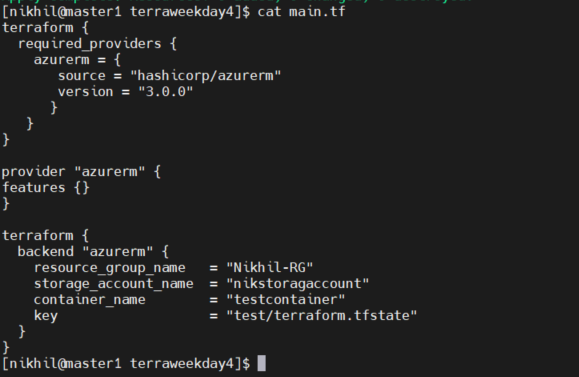
In the below example, we have added the Azure storage account and configured the backend block where we saved the terraform state remotely.
We checked in the Azure dashboard where the terraform state file is saved