Linux Shell Scripting for DevOps 🐧📝🔧
Nikhil Patil
👨💻 I love Linux & DevOps! 💻
🐧 Linux👨💻 | DevOps & Cloud Enthusiast | 🌍 Azure Admin | 🛠️ Ansible | 📂 Git | 🐳 Docker | 🔑 OpenLDAP | 🖥️ System Admin | | 🚀 Jenkins 🛠️
🏠 Pune
🌟 I'm really into using and managing computers with Linux. I also like making things work smoothly and quickly.
📖 I work with Microsoft Azure, use tools like Ansible and Git to automate tasks, and make software run in containers with Docker.
🔒 I handle access and security using OpenLDAP, and I'm all about keeping systems running smoothly.
🌐 Exploring opportunities in cloud and DevOps.
📧 Get in touch: nikrpatil1997@gmail.com
Day - 4 #90daysofdevoschallenge
What is Kernel? 🌐
The Linux Kernel is like the heart of a computer system. It is the central core that manages all the hardware and software interactions.
What is Shell? 🐚🖥️
A shell is a special user program that provides an interface for users to use the operating system. Shell accepts human-readable commands from users and converts them into something which the kernel can understand.
Task-1 Explain in your own words and examples, what is Shell Scripting for DevOps. 💻🔧✨
A shell script is a script written for the shell, of an operating system. Shell scripts are used to automate the frequently performed operations and to run the sequence of commands as a single command. With the help of shell scripts, we automate the repetitive tasks.
For example, We have backup activity in our environment so with the help of shell scripts we backup data daily and stored it in any location. For installing packages, and configuring tools, we also used shell scripts.
Task-2 What is #!/bin/bash? can we write #!/bin/sh as well? 📝🐚🌟
#! /bin/bash is called a "shebang" line at the beginning of a script file. It is used to specify the interpreter that should be used to run the script. When you execute a script with this shebang, the system will automatically launch the specified interpreter to interpret and execute the script's commands.
#! /bin/sh is also a shebang line used to specify the default system shell (commonly the Bourne shell) as the interpreter for the script. The Bourne shell /bin/sh is a minimalist shell, and its features may vary slightly depending on the operating system.
The choice between #! /bin/bash and #! /bin/sh depends on the specific requirements of your script.
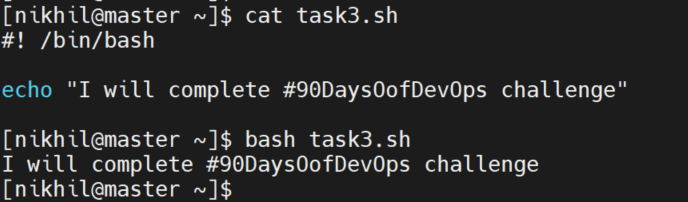
Task-3 Write a Shell Script which prints I will complete #90DaysOfDevOps challenge. 📝🐚📅
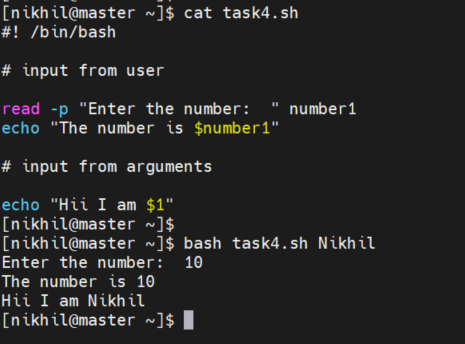
Task-4 Write a Shell Script to take user input, input from arguments, and print the variables. 📝🐚🖨️
This script used the read utility to read user input and stored the input in the number1 variable.
-p option used for the prompt for user input.
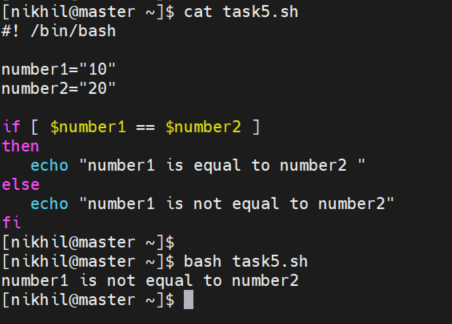
Task-5 Write an Example of If else in Shell Scripting by comparing 2 numbers. 📝🐚➕➖