Nikhil Patil
👨💻 I love Linux & DevOps! 💻
🐧 Linux👨💻 | DevOps & Cloud Enthusiast | 🌍 Azure Admin | 🛠️ Ansible | 📂 Git | 🐳 Docker | 🔑 OpenLDAP | 🖥️ System Admin | | 🚀 Jenkins 🛠️
🏠 Pune
🌟 I'm really into using and managing computers with Linux. I also like making things work smoothly and quickly.
📖 I work with Microsoft Azure, use tools like Ansible and Git to automate tasks, and make software run in containers with Docker.
🔒 I handle access and security using OpenLDAP, and I'm all about keeping systems running smoothly.
🌐 Exploring opportunities in cloud and DevOps.
📧 Get in touch: nikrpatil1997@gmail.com
Introduction
In this blog, we explore Files Permissions and ACL in Linux
Task - 1 File Permissions
In Linux, file permissions determine who can access a file and what actions they can perform on it. file permissions in Linux help protect and control access to files and directories, ensuring that only authorized users can read, modify, or execute them.
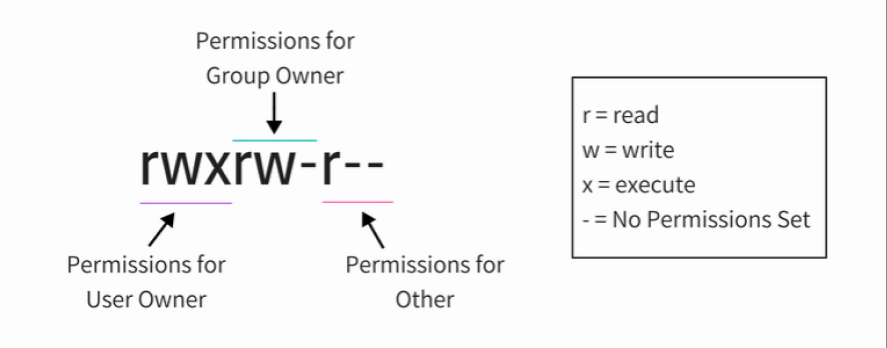
owner - The user who owns the file.
Group - Users who belong to the same group as the file.
Others - All users who are not the owner and not in the group of the file.
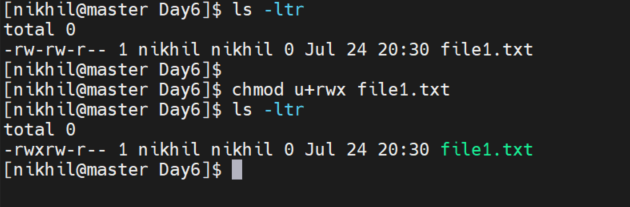
Create a simple file and do ls -ltr to see the details of the files

chmod Linux command used to change file permissions.

## Changing user permission of the file

chmod u+rwx file1.txt
Task - 2 Access Control List (ACL)
ACL stands for Access Control List. It is a mechanism that allows more fine-grained control over file and directory permissions. ACLs provide a way to assign permissions to specific users or groups beyond what is allowed by default.
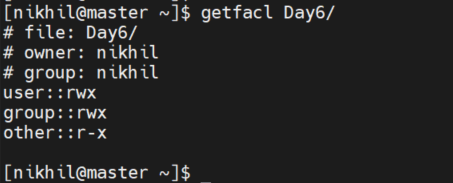
# To check the ACL of Day6 folder

getfacl Day6/
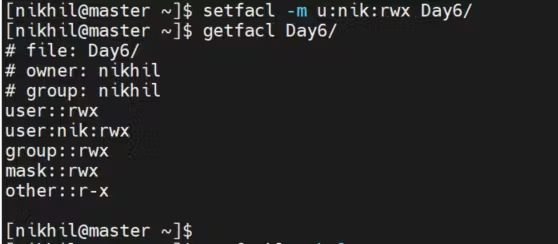
# Assigned acl

setfacl -m u:nik:rwx Day6/
getfacl Day6