Basic Linux Commands
Nikhil Patil
👨💻 I love Linux & DevOps! 💻
🐧 Linux👨💻 | DevOps & Cloud Enthusiast | 🌍 Azure Admin | 🛠️ Ansible | 📂 Git | 🐳 Docker | 🔑 OpenLDAP | 🖥️ System Admin | | 🚀 Jenkins 🛠️
🏠 Pune
🌟 I'm really into using and managing computers with Linux. I also like making things work smoothly and quickly.
📖 I work with Microsoft Azure, use tools like Ansible and Git to automate tasks, and make software run in containers with Docker.
🔒 I handle access and security using OpenLDAP, and I'm all about keeping systems running smoothly.
🌐 Exploring opportunities in cloud and DevOps.
📧 Get in touch: nikrpatil1997@gmail.com
Day - 3 #90daysofdevoschallenge
To view what's written in a file.
cat file1.txt
To change the access permissions of files.
chmod 755 file1.txt
The 755 means the owner has full access to read, write, and execute the file, while the group members and all other users have read and execute permissions but no write permissions.
To check which commands you have run till now.
history
To remove a directory/ Folder.
rmdir < directory_name > ## delete empty directory
rm -r < directory_name > ## -r is used for recursive
To create a fruits.txt file and to view the content.
touch fruits.txt
cat fruits.txt
Add content in devops.txt (One in each line) - Apple, Mango, Banana, Cherry, Kiwi, Orange, Guava.
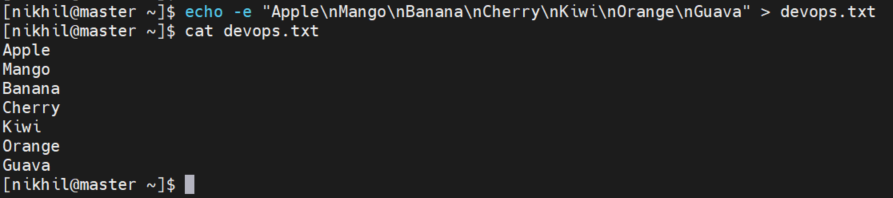
The -e option Is used for enabling interpretation of backslash escapes.
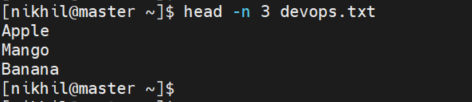
To Show only top three fruits from the file.
head is a command-line utility in Linux used to display the beginning portion of a file or output from a command.
The -n is used to print the lines from a file.
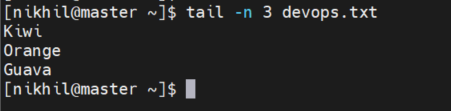
To Show only bottom three fruits from the file.
tail is a command-line utility in Linux used to display the end portion of a file or output from a command.
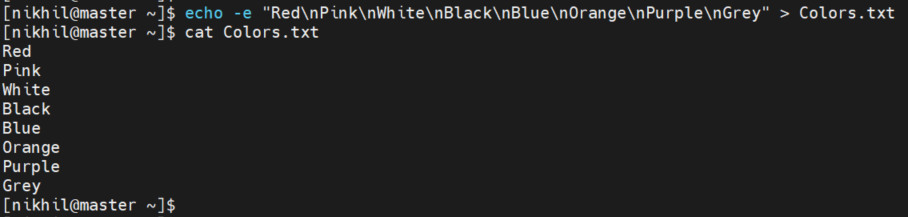
To create another file Colors.txt and to view the content.
touch Colors.txt
cat Colors.txt
Add content in Colors.txt (One in each line) - Red, Pink, White, Black, Blue, Orange, Purple, Grey.
Task -11 To find the difference between fruits.txt and Colors.txt file.
The diff command in Linux is used to compare two files line by line and display the differences between them.
diff fruits.txt Colors.txt


